
iVerify Basic
iVerifyBusiness
2.921.00 Reviews
- Version
- 16.17.0
- Installs
- 10.00K
- Age Rating
- Everyone
Screenshots
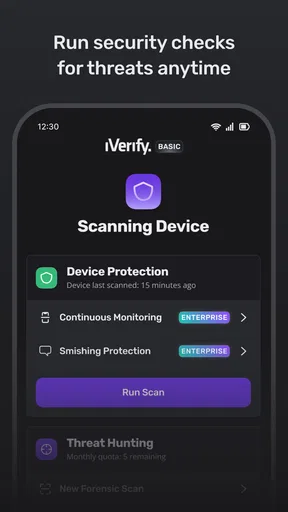
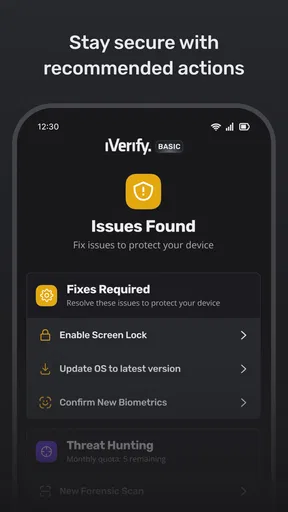
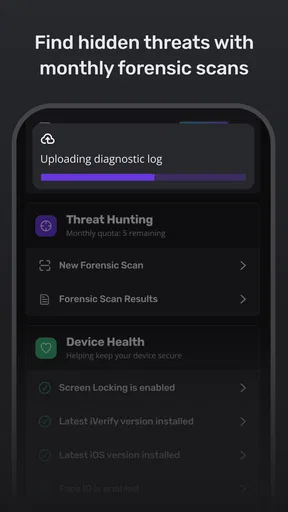
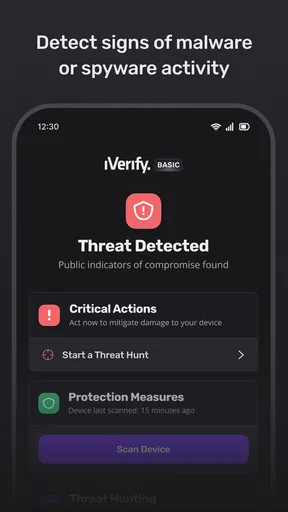
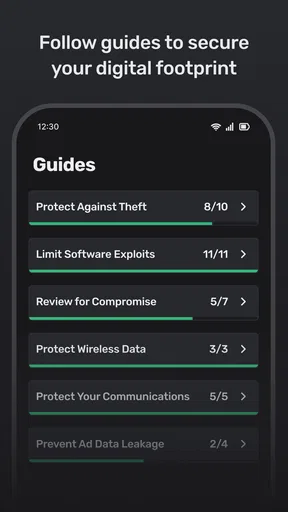
Our Review of iVerify Basic
 Analysis by Appyee
I tend to judge a phone-security app by a simple test: does it help me make safer choices, or does it merely make me feel as if I have? That distinction matters with iVerify Basic. It is a paid business app from iVerify, priced at $0.99, and its appeal is guidance and security awareness rather than a promise that one install will make a phone invulnerable. I’d treat it as a practical prompt to review habits, not a replacement for keeping the operating system current or thinking carefully before tapping links.
What the price does—and doesn’t—tell you
There is no free tier to compare with a paid upgrade here: the listed price is $0.99. That makes the decision relatively simple, but it still helps to be clear about what you are paying for. I would consider the purchase worthwhile if I want a structured way to think through device security and am likely to act on the advice. If I only want a one-time reassurance badge, I would be less convinced.
The price alone does not establish whether the app will suit every phone or security concern. Before buying, I’d check that it is compatible with my device and think about what I want it to help me do. A security guide can be useful without replacing built-in protections, and I would not pay expecting it to monitor every account or prevent every scam.
Where practical guidance can earn its keep
The useful part of a security app is often not a dramatic scan result; it is the moment it gets me to fix something I had been putting off. A checklist can turn vague intentions—use stronger sign-in protection, check for updates, review security settings—into small actions I can complete one by one. That is a more grounded kind of value than the promise of total protection.
For example, imagine I’m setting up a phone for a family member who is comfortable with calls and messaging but not with security menus. I could use the app as a conversation guide: review the device’s security advice together, help them understand why an account needs stronger protection, then make the change in the relevant account or phone settings. The important trade-off is that guidance still requires the user to follow through; installing the app is not the same as completing those steps.
Limits worth keeping in view
I would not treat a security check as a guarantee that a device is clean or that an account cannot be compromised. Phone safety also depends on software updates, account recovery choices, app sources, passwords, and judgment around unexpected messages. An app can make those topics easier to address, but it cannot make risky habits harmless.
It is also worth separating device security from broader digital safety. If my main concern is fraudulent texts, account takeover, or a lost phone, I may need to use the relevant built-in controls, contact the service provider, or change account credentials directly. I would use iVerify Basic as one part of a routine, not as the only tool in it. People who already maintain a careful security checklist may find that a dedicated guide adds little.
Who is most likely to benefit
I see the strongest fit for someone who wants approachable security guidance and would rather work through recommendations than research every setting from scratch. It may also suit a small-business user who carries work and personal accounts on one device and wants a regular reminder to review basic protections. That does not make it a business-management suite; the category label should not be mistaken for features aimed at managing a team.
On the other hand, I’d skip it if I expect an automatic shield that silently handles every threat, or if I’m looking for a complete password manager, antivirus replacement, or remote-device administration system. Those are different jobs. A built-in security page may be enough for someone who only needs to check for updates, while someone facing a specific account problem should go straight to that service’s recovery and security tools.
Getting Started with iVerify Basic
First things first, getting iVerify Basic up and running is pretty straightforward. Once you download it from the app store, you’re greeted with a simple and intuitive interface. No overwhelming menus or confusing jargon—just straightforward options that guide you through the process of securing your device.
What I appreciate right off the bat is how the app doesn’t bombard you with ads or push notifications. It’s a refreshing change from the usual app experience where you’re constantly being asked to upgrade or buy extras. Here, it’s all about getting you set up efficiently and effectively.
Security Features You’ll Love
Now, onto the juicy bits—the features! iVerify Basic offers a comprehensive suite of tools designed to enhance your phone’s security. From checking for vulnerabilities to offering suggestions on how to fix them, the app covers all the bases.
One feature that stands out is the step-by-step guidance on improving your device’s security posture. It’s like having a personal cybersecurity expert in your pocket. The app walks you through enabling features like two-factor authentication and even provides tips on creating stronger passwords.
Another cool aspect is the app’s ability to scan for security updates. It alerts you when your operating system or apps are outdated, ensuring you’re always up-to-date with the latest protections. This proactive approach means you’re not just reacting to threats but actively preventing them.
User Experience and Interface
Let’s talk about the user interface for a second. iVerify Basic nails it with a clean, minimalistic design that doesn’t distract you from its main purpose—security. The navigation is smooth, and everything is where you’d expect it to be, making the entire experience seamless.
For those who might not be tech-savvy, the app does a fantastic job of breaking down complex security concepts into digestible bits. It’s like having a friendly guide helping you through what could otherwise be a daunting process.
The practical way to use this kind of guide is to treat each recommendation as a task, rather than rushing through every prompt. I’d check one setting at a time, make the change in the phone or account where it belongs, and then return to the app. That makes it easier to tell the difference between advice I have acted on and advice I still need to follow up on. It also avoids the false comfort of seeing a checklist without knowing whether the underlying change was actually completed.
For a busy person, that workflow can fit into a short maintenance session: review a recommendation while waiting for a meeting, make the change when there is time to sign in safely, and revisit the remaining items later. I would avoid changing account security settings in a hurry if I do not have access to recovery details. Stronger authentication is useful, but losing access to the recovery method can create its own problem.
Real-Life Benefits
So, why should you care about all these features? Well, in a world where digital privacy is becoming increasingly important, having an app like iVerify Basic is almost essential. It’s not just about preventing hackers from accessing your data; it’s about peace of mind.
Knowing that your device is secure—and that you’re doing everything possible to keep it that way—lets you browse, shop, and communicate without that nagging worry in the back of your mind. It’s a small investment in time that pays off big when it comes to protecting your personal information.
One non-obvious benefit of a guided review is that it can help turn security into a repeatable household routine. I would not assume every suggestion needs attention every day. Instead, I’d use the app when setting up a device, after a major change to my accounts, or when helping someone who has never reviewed their protections. The value is in making the next sensible step easier to identify, not in creating a reason to constantly worry about threats.
There is also a useful distinction between device advice and account advice. A phone can be up to date while an email account still has a weak sign-in setup; conversely, a well-protected account does not fix an outdated device. I’d use the recommendations to notice which layer needs attention, then complete that work in the appropriate settings. That habit is more reliable than assuming one security app can cover both layers automatically.
How it compares with the usual options
Compared with relying only on a phone’s built-in security settings, a guided app may be easier for someone who does not know which settings deserve attention. Built-in tools remain the place where many device changes are actually made, so I see the two approaches as complementary rather than competing. If I already know what to check and prefer doing it myself, the built-in route may be enough; if I want explanations and prompts, a dedicated guide has a clearer role.
It is not the same purchase as a password manager or a conventional antivirus product. A password manager is aimed at storing and organizing credentials; antivirus tools focus on a different set of protections. I would choose among these based on the problem I am trying to solve rather than expecting iVerify Basic to stand in for all of them. For a suspicious message, for instance, I would still verify it through the service’s official app or website instead of trusting a general security check to settle the question.
If you are considering it for a work phone, the distinction matters even more. A small-business owner may find security reminders useful for personal device habits, but a company that needs centralized device policies or employee administration should look for tools designed for that job. The business category does not by itself mean that the app manages multiple devices or workplace accounts.
Checking fit before you install
The app is rated for Everyone, which is a broad content classification rather than a guarantee that every person will find the advice relevant. Its current version is 16.17.0, and it requires Android 9 or later. I’d check the phone’s Android version before paying, particularly if I’m setting it up on an older handset or buying it for a relative. A mismatched operating system can turn a promising security routine into a frustrating start.
iVerify has an average rating of 2.9 from around a hundred ratings, with a couple dozen written reviews, and it has over 10,000 installs. I would read that reception as a reason to be selective, not as proof that the app is either unusable or right for everyone. Security apps are judged against very different expectations: one person may want clear education, while another expects automatic threat blocking. I’d compare the app’s actual role with my own expectation before purchasing.
One practical question is whether the app can fix a problem for me. I would approach it as a guide that points me toward actions, then expect to make those changes in the relevant device or account settings. Another is whether it replaces routine updates: it should not change my habit of installing operating-system updates and reviewing important account alerts. If I want a tool to manage passwords or administer a fleet of phones, I would choose a product built specifically for that purpose instead.
Final Thoughts
In summary, iVerify Basic is a must-have for anyone serious about their smartphone security. It’s easy to use, packed with valuable features, and offers practical advice that you can implement immediately. Whether you’re a tech newbie or a seasoned pro, this app has something to offer.
So, if you haven’t checked it out yet, I highly recommend giving it a go. It might just be the security upgrade your phone’s been waiting for. And hey, who doesn’t want a little extra peace of mind these days?
My recommendation is narrower than “everyone should get it”: I’d buy it if a guided security review would help me take action, and I’d skip it if I already have a routine that covers the same ground or need a different kind of protection. At $0.99, the decision is modest, but the useful return still depends on whether I follow the advice. I’d rather treat it as a friendly nudge toward better habits than as a guarantee that nothing can go wrong.
Verdict
Strengths of iVerify Basic
- User-friendly interface for beginners.
- Comprehensive device security scans.
- Regular updates enhance protection.
- Detailed security reports available.
- Lightweight app, minimal resource use.
Limitations of iVerify Basic
- Limited features in the basic version.
- No support for older OS versions.
- Requires manual scans frequently.
- Some features need premium upgrade.
- Notifications can be excessive.
Similar Picks in This Category
View All
LinkedIn: Community & Network
LinkedIn3.8

Zoom Workplace
zoom.com4.1

Microsoft Teams
Microsoft Corporation4.6

Meta Business Suite
Meta Platforms, Inc.4.6

Webex Meetings
Cisco Systems, Inc.4.5

TeamViewer Remote Control
TeamViewer4.4
Frequently Asked Questions
What is iVerify Basic and what does it do?
iVerify Basic is a security app designed to help users protect their mobile devices. It provides tools for detecting vulnerabilities, improving privacy settings, and offering security tips. The app acts as a comprehensive guide to enhancing your device's security through easy-to-follow recommendations and actionable insights.
Is iVerify Basic compatible with all devices?
iVerify Basic is primarily designed for iOS devices. It works on a wide range of iPhones and iPads, ensuring compatibility with the latest versions of iOS. However, users should check the app store listing for specific device requirements to ensure their device is supported.
Does iVerify Basic require an internet connection to function?
iVerify Basic does not require a constant internet connection to operate, as many of its features work offline. However, an internet connection may be necessary for downloading updates or accessing certain features that require online resources, ensuring you have the latest security information.
How user-friendly is iVerify Basic for non-technical users?
iVerify Basic is designed with a user-friendly interface, making it accessible to non-technical users. It provides clear instructions and easy-to-understand recommendations, ensuring that even those with limited technical knowledge can effectively use the app to enhance their device's security.
Is there a cost associated with using iVerify Basic?
iVerify Basic may have a purchase cost, typically reflected in a one-time fee at the time of download. There are no ongoing subscription fees, making it a cost-effective option for users seeking to improve their device security without recurring charges. Be sure to check the app store for current pricing details.
